GoForum › 🌐 V2EX

使用 OpenCode 调用 V2EX AI API 的配置文件例子
Livid ·
2026-08-30 17:58 ·
0 次点赞 · 0 条回复
之前的 OpenCode 配置例子帖子中的配置文件非常 bare bone:
https://edge.v2ex.com/t/1227634
所以其实很多 OpenCode 的额外功能会因此没有打开。
这里是一个我目前测试过的更完整的配置文件例子:
文件位置 ~/.config/opencode/opencode.jsonc
内容是目前 V2EX 上能够提供的 3 个 GLM 模型及其能力,其中 GLM 5.3 Flash 能支持图片。
{
  "$schema": "https://opencode.ai/config.json",
  "disabled_providers": [],
  "provider": {
    "v2ex": {
      "name": "v2ex",
      "npm": "@ai-sdk/openai-compatible",
      "options": {
        "baseURL": "https://edge.v2ex.com/chat/v1"
      },
      "models": {
        "coder": {
          "name": "GLM-5.2",
          "reasoning": true,
          "temperature": true,
          "interleaved": { "field": "reasoning_content" },
          "limit": { "context": 1000000, "output": 131072 },
          "modalities": { "input": ["text"], "output": ["text"] },
          "cost": { "input": 1.4, "output": 4.4, "cache_read": 0.26, "cache_write": 0 },
          "variants": {
            "high": { "reasoningEffort": "high" },
            "max": { "reasoningEffort": "max" }
          }
        },
        "glm-5.3": {
          "name": "GLM-5.3",
          "reasoning": true,
          "temperature": true,
          "interleaved": { "field": "reasoning_content" },
          "limit": { "context": 1048576, "output": 131072 },
          "modalities": { "input": ["text"], "output": ["text"] },
          "cost": { "input": 1.4, "output": 4.4, "cache_read": 0.26, "cache_write": 0 },
          "variants": {
            "low": { "reasoningEffort": "low" },
            "high": { "reasoningEffort": "high" },
            "max": { "reasoningEffort": "max" }
          }
        },
        "glm-5.3-flash": {
          "name": "GLM-5.3-Flash",
          "attachment": true,
          "reasoning": true,
          "temperature": true,
          "interleaved": { "field": "reasoning_content" },
          "limit": { "context": 1048576, "output": 131072 },
          "modalities": { "input": ["text", "image"], "output": ["text"] },
          "cost": { "input": 0.075, "output": 0.25, "cache_read": 0.015, "cache_write": 0 },
          "variants": {
            "low": { "reasoningEffort": "low" },
            "high": { "reasoningEffort": "high" },
            "max": { "reasoningEffort": "max" }
          }
        }
      }
    }
  }
}
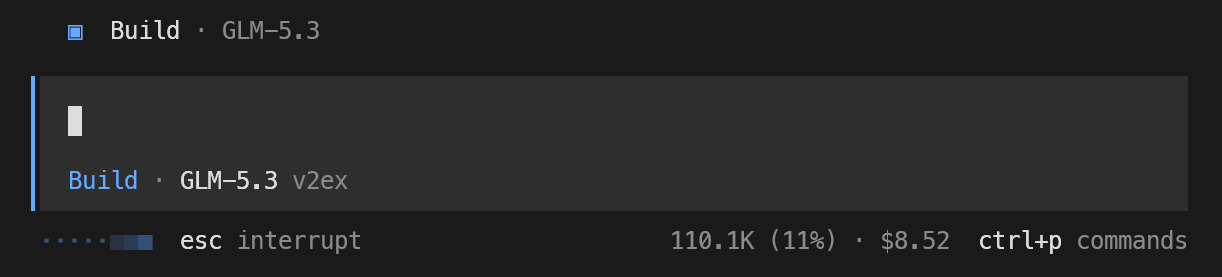
这样配置之后,除了可以看到思考过程,还可以看到 context 占用和费用预估(如果是使用类似官方 API 的话)。
0 条回复
添加回复
你还需要 登录
后发表回复